
Domains, Hosting, and Website Ownership Explained
Who really owns your website? Learn the difference between a domain and hosting, which accounts your business should hold, and how to check in 15 minutes.
A business owner asks for a small change on their website, like a new phone number or an updated price. Then they find out nobody on their team can log in. The domain was registered by a freelancer years ago, the hosting renews on someone else’s credit card, and the only admin account belongs to a person who has since moved on. Nothing is broken yet, but the business doesn’t control its own website.
This happens more often than most people expect, and it’s almost always avoidable. You don’t need to be technical to fix it. You need to know what a domain and hosting are, how they connect, and which accounts should be in your business’s name. This guide explains domains, hosting, and website ownership in plain language, with a short checklist you can work through today.
Domain and hosting: the simple version
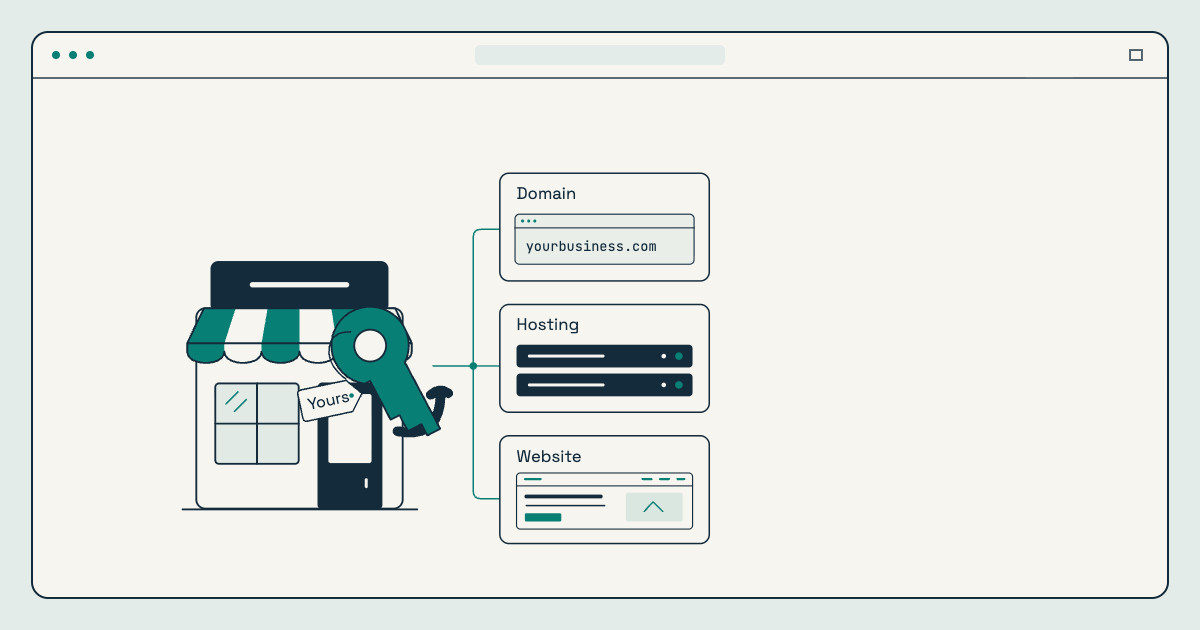
Every website depends on three separate things, and they’re often bought from different companies:
- The domain name is your address, such as yourbusiness.com. It’s what people type in and what appears in your email addresses.
- The hosting is the space where your website lives. It’s a server, a computer that stays online, which stores your website’s files and sends them to visitors.
- The website is what people actually see: the design, the pages, the text and photos, and the software that runs it, such as WordPress.
A simple way to picture it: the domain is your street address, the hosting is the lot your building sits on, and the website is the building itself. You can move a building to a new lot and keep the same address. That’s exactly what happens when a business changes hosting companies and keeps its domain.
What is a domain name?
You don’t buy a domain name outright. You register it through a company called a registrar, usually for one to ten years at a time, and then renew it. The person or business listed as the registrant is the legal holder of the domain. That’s the most important detail in this whole article: whoever is listed as the registrant controls the domain.
Businesses in the Philippines often choose between a global ending such as .com and a local one such as .ph or .com.ph. Either can work. Pick one that’s easy to say and spell, matches your business name, and that you can keep renewing for years.
What is web hosting?
Hosting is a service you pay for, usually monthly or yearly. The host keeps your website online, stores its files and database, and often provides the SSL certificate that shows the padlock in the browser. Some hosting plans also include email, backups, and a staging area for testing changes before they go live.
How the domain and hosting connect
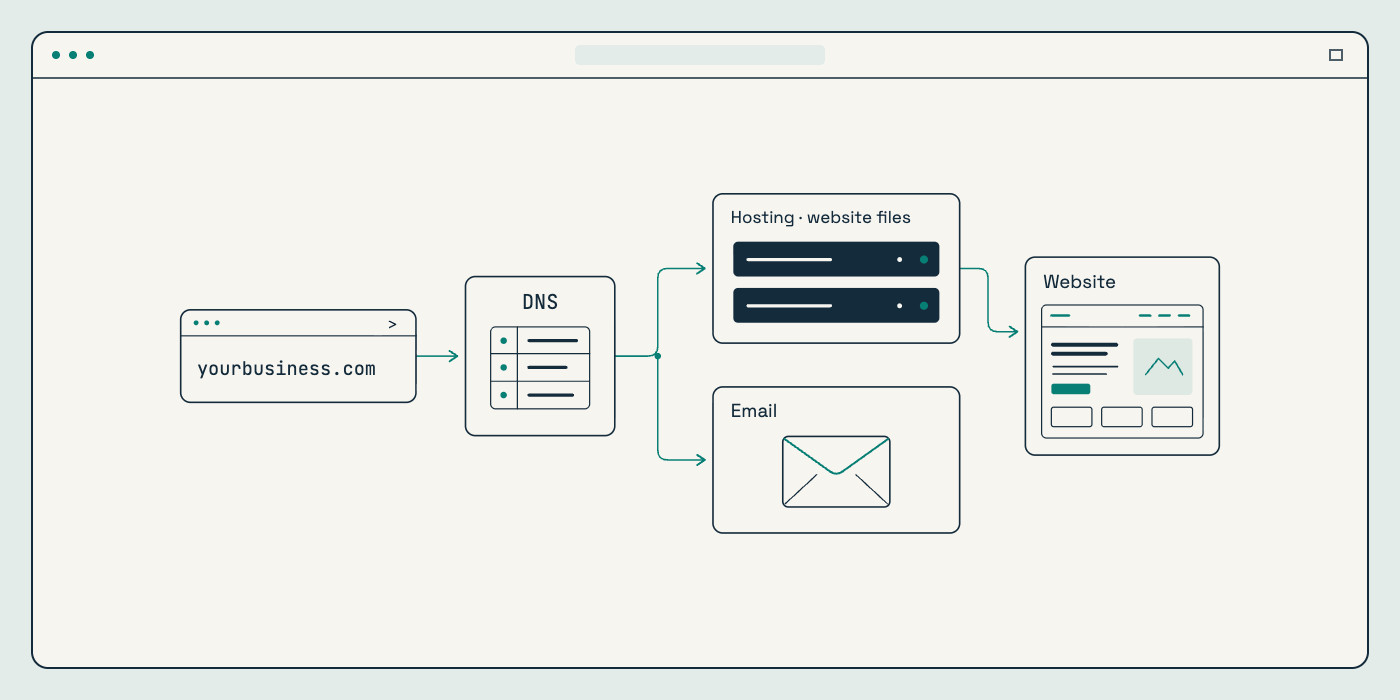
Your domain and hosting are linked by DNS, a set of records that works like a directory. When someone types your address, the DNS records tell their browser which server to go to. Other DNS records tell email where to deliver messages sent to your address. That’s why changing DNS settings without care can take a website or your email offline, even when nothing is wrong with the website itself.
Domain vs hosting: the differences that matter
People often mix the two up because one company sometimes sells both. They’re still separate services with separate renewals, and it helps to know which is which when something needs to change.
| Domain name | Hosting | |
|---|---|---|
| What it is | Your website and email address | The server space that keeps your website online |
| Who you pay | A domain registrar | A hosting company, or a platform like Godaddy |
| How often | Every one to ten years | Usually monthly or yearly |
| If it lapses | Your website and email stop working, and someone else may register the name | Your website goes offline, and files may be deleted after a while |
| Can you move it? | Yes, to another registrar, with a transfer code | Yes, by copying the website to a new host and updating DNS |
What owning your website really means
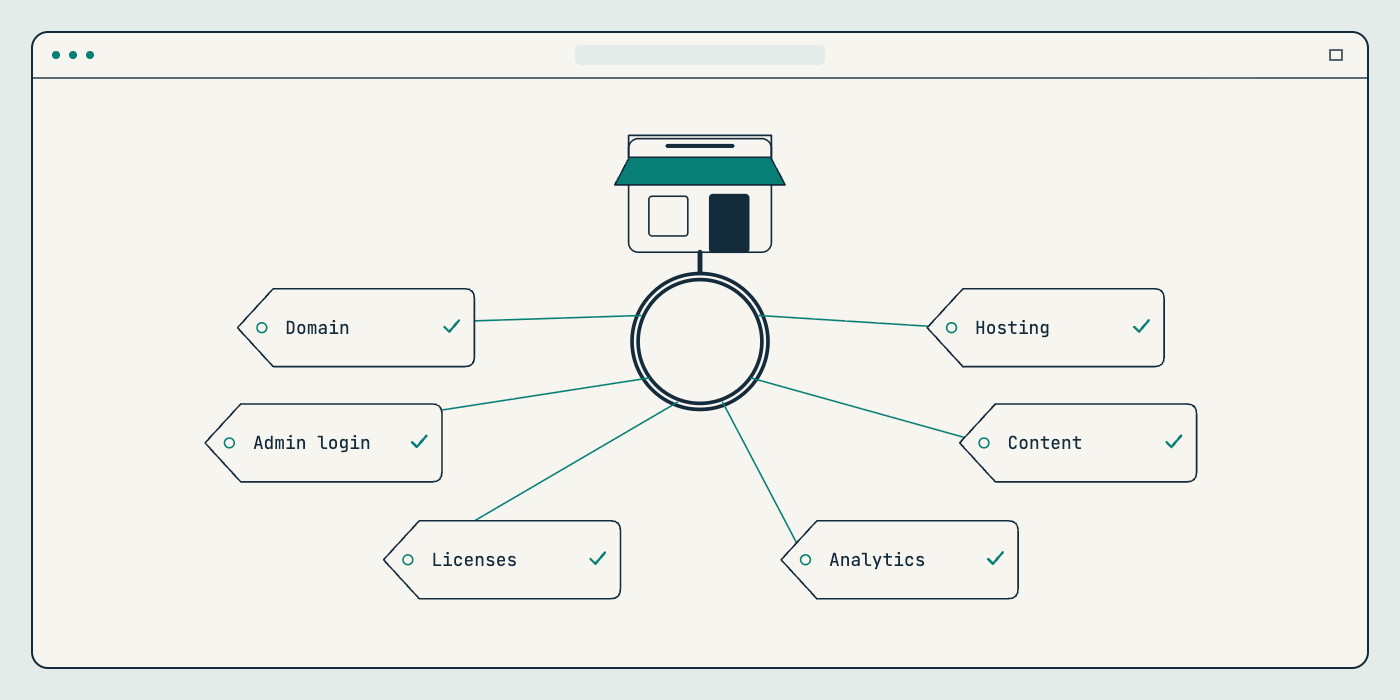
Paying for a website doesn’t automatically mean you control it. Real website ownership means your business holds, or can always get into, each of these:
- The domain registration. Your business should be the registrant, with a contact email your business controls, not a personal inbox or a developer’s address.
- The hosting account. Ideally it’s in your business’s name. If a partner manages hosting for you, make sure you can get a full backup of your website whenever you ask.
- An administrator login. On a WordPress website, someone at your business should have their own administrator account, separate from your developer’s.
- Your content and design. Your text, photos, logo, and the finished design should belong to you once the project is paid for. Your proposal or contract should say so plainly.
- Licenses. Paid themes, plugins, fonts, and stock photos come with licenses. Know whose account they’re under and what happens when they come up for renewal.
- Your connected accounts. Business email, Google Analytics, Google Search Console, your Google Business Profile, and your social profiles should all have your business as an owner, not only as a guest.
Common website ownership problems, and how to avoid them
The domain is in someone else’s name
It’s common for a web designer, a relative, or a former employee to register the domain “to help out.” It works fine until that person is unreachable or the relationship ends. Ask for the domain to be registered in your business’s name from the start. If it isn’t, ask for it to be moved to your own registrar account now, while everyone is on good terms.
A renewal fails without anyone noticing
The card on file expires, and the renewal reminder goes to an old inbox. The website and email stop working, often on a busy day. Some registrars offer a short grace period after expiry, but it isn’t guaranteed, and getting a lapsed domain back can cost more than renewing it. Turn on auto-renew, keep the payment card current, and send reminders to an email address your team actually reads.
Hosting is bundled and can’t be taken with you
Bundled hosting can be convenient, but some packages make it hard to leave. Before you sign, ask a simple question: “If we move on, will you give us a full copy of the website and its database?” A clear yes is a good sign.
Licenses sit in a former provider’s account
Premium plugins and themes stop receiving updates when their license lapses. If the license belongs to a previous provider, your website can fall behind on updates without anyone noticing. Keep a list of paid licenses and move them to your own account, or have your current provider confirm who renews each one.
A website you can’t log in to isn’t really yours. Put the domain in your business’s name and keep the keys where your team can find them.
The Firstrive team
Hosted platforms have their own rules
With a hosted platform like Shopify, the hosting is part of the platform subscription. You own your store account, your products, and your content, and you can export your product and customer data. The theme and apps, though, run only on that platform. That’s a fair tradeoff for many stores, but it’s worth knowing before you choose. Our ecommerce team can help you weigh a hosted Shopify store against a self-hosted WooCommerce store.
How to check who owns your website today
This takes about 15 minutes, and it’s worth doing even if nothing seems wrong.
- Look up your domain. Use ICANN Lookup to see your domain’s registrar and expiry date. Many registrant details are hidden for privacy, so you may need to log in to the registrar to confirm the owner.
- Log in to your registrar. Check that the registrant is your business, that auto-renew is on, and that the contact email is one your team reads.
- Log in to your hosting account. Confirm whose name it’s under, when it renews, and whether backups are running.
- Check your WordPress users. Make sure someone at your business has an administrator account, and remove accounts for people who no longer need access.
- List your licenses and connected accounts. Note who owns each paid plugin, theme, analytics property, and business profile.
- Store the details safely. Keep logins in a password manager your business controls, turn on two-factor authentication, and make sure more than one trusted person can get in.
If something on this list can’t be found, that’s useful to know now. It’s much easier to sort out before you need to make an urgent change. A website maintenance plan can take over the routine side, including updates, backups, and regular checks.
Choosing hosting for your business website
There’s no single best host. The right choice depends on the kind of website you have, how much traffic it gets, and how much you want to manage yourself. The main options are:
- Shared hosting: the lowest cost, with many websites sharing one server. It’s fine for a small brochure site, but it can slow down when neighbors get busy.
- Managed WordPress hosting: set up for WordPress, usually with automatic backups, staging, and support that understands WordPress. It’s a good fit for most service business websites.
- Cloud or VPS hosting: dedicated resources that grow with you. It suits busier websites and online stores, and it needs someone to manage it.
- Hosted platforms: Shopify and similar platforms include hosting in the subscription, so there’s no separate server to look after.
Whichever you choose, ask these questions before you sign up:
- How often are backups taken, how long are they kept, and how do we restore one?
- Is an SSL certificate included?
- Where are the servers located, and is that close to our customers?
- Is there a staging area for testing changes?
- What does the plan cost when it renews, not only in the first year?
- How do we reach support, and during which hours?
Hosting is part of the setup in every WordPress development project, so if you’re not sure which option fits, we can recommend one as part of the proposal.
Moving your domain or hosting without breaking things
Moving providers is routine when it’s planned. Most problems come from rushing a step or forgetting about email.
Transferring a domain
To move a domain to a different registrar, you unlock it at the current registrar, request a transfer code (often called an auth or EPP code), and start the transfer at the new registrar. Transfers usually add a year to your registration. For common endings such as .com, a domain usually can’t be transferred for 60 days after it’s registered or moved. As long as the DNS records stay the same, your website and email keep working during the transfer.
Moving to a new host
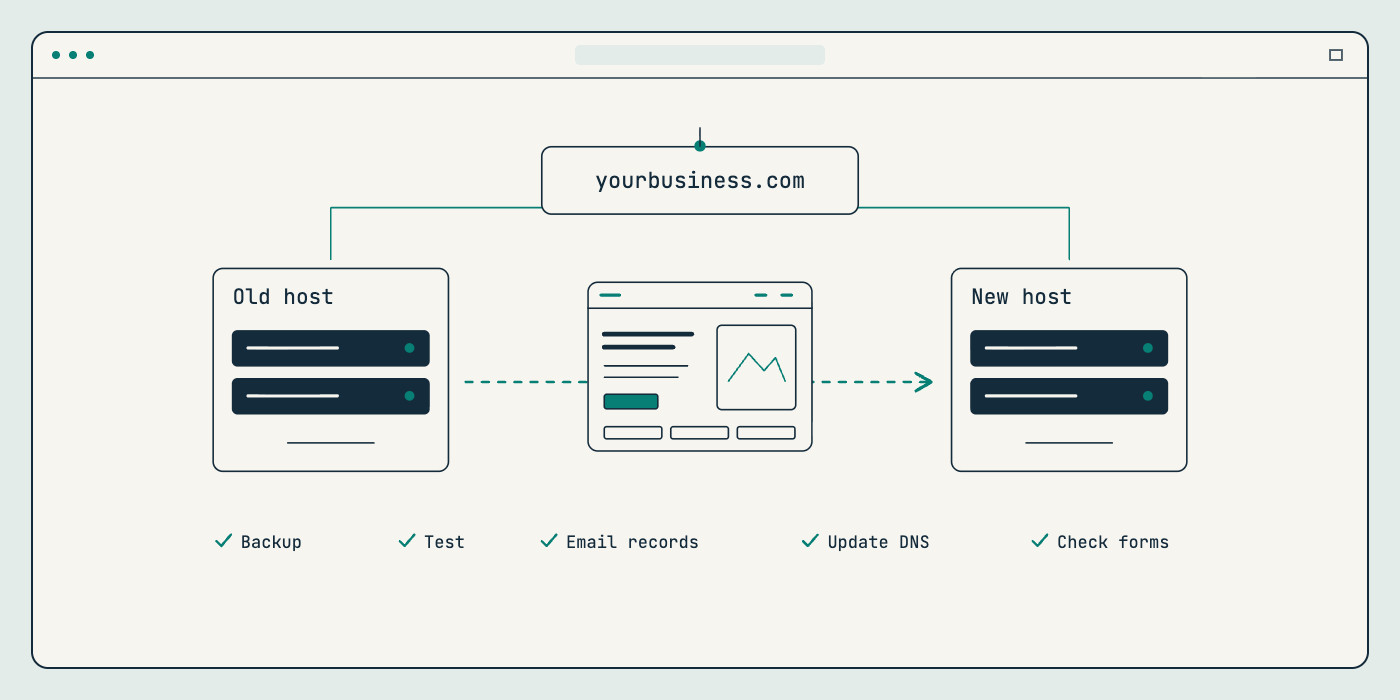
A careful hosting move follows the same basic steps:
- Take a full backup of your website files and database.
- Set up the website on the new host and test it before switching.
- Note your email settings, especially your MX records, so email isn’t interrupted.
- Update the DNS to point to the new host, then check the pages, forms, SSL certificate, and email.
- Keep the old hosting for a short time until you’re sure everything works.
Changing your domain name
Changing to a new domain name is a bigger step, because search engines and customers know your old address. Keep the old domain, set up permanent (301) redirects from every old page to its new one, and tell Google through Search Console. Our SEO service covers redirects and technical checks so you keep as much of your existing search visibility as possible.
How Firstrive handles domains, hosting, and ownership
We’d rather you never have to wonder who owns your website. On every project, we:
- List the hosting, domain, and any paid plugins in the proposal, so you know what’s included and what you’ll pay for separately.
- Recommend registering your domain and hosting in your business’s name, and set things up that way wherever we can.
- Give your team its own administrator access, and walk you through the website at handover.
- Keep care simple after launch. A maintenance plan covers updates, backups, and routine checks, and you can take your website with you if you ever move on.
If you’re planning a new website, ownership is one of the first things to settle. Our small business website planning checklist covers it alongside your pages, content, and features. If you’re starting a new project, our web design service builds all of this into the plan from day one.
Frequently asked questions
What is the difference between a domain and hosting?
A domain is your website’s address, such as yourbusiness.com, and you register it through a domain registrar. Hosting is the server space where your website’s files are stored and kept online. You need both, they renew separately, and they can come from different companies.
Do I own my domain if my web designer registered it?
Not necessarily. Whoever is listed as the registrant holds the domain. If your designer registered it under their own name or account, ask them to move it into your business’s name or your own registrar account. Most professionals will help, and it’s easiest to do while the relationship is good.
Can I move my website to a different hosting company?
Yes. You take a full backup of the website, set it up on the new host, test it, and then update your DNS to point to the new server. Plan for your business email too, since it often depends on the same DNS settings.
What happens if my domain name expires?
Your website and any email on that domain stop working. Some registrars offer a short grace period to renew, sometimes with an extra fee, but after that the domain can be released and registered by someone else. Turning on auto-renew with a current payment method is the simplest way to prevent it.
Let’s talk about your next step
Not sure who holds the keys to your website, or planning a new one and want ownership set up properly from the start? Firstrive designs, builds, and looks after websites for small businesses and startups in the Philippines and around the world.
Share your project details and we’ll review your needs, then follow up with questions or a proposed scope and quote. Request a free quote. Already have a website? Start with a free website audit for an honest look at what’s working and what to improve.
Tell us about your project
Let’s talk about your next step.
Share your project details. We’ll review your needs and follow up with questions or a proposed scope and quote.