
Small Business Website Planning Checklist: 10 Things to Decide Before You Build
Planning a new small business website? Use this 10-step website planning checklist to set your goals, pages, content, SEO and features before you build.

Most website problems start before anyone opens a design tool. Pages get added because a competitor has them, the contact form ends up at the bottom of a long page, and the photos everyone meant to take never arrive. The site launches late, costs more than expected, and still doesn’t explain what the business does.
A little planning prevents most of that. You don’t need technical knowledge to do it. You need clear answers about your business, your customers, and what you want people to do when they visit. This small business website planning checklist walks you through those answers in the order that makes the rest of the project easier, whether you’re building your first website or replacing one that no longer fits.
Why planning comes before design
Design turns decisions into pages. If the decisions aren’t made yet, the design has to guess, and guesses turn into revisions. A clear plan gives your web designer something solid to work from, gives you a realistic quote, and makes it much easier to compare proposals, because everyone is pricing the same thing.
Planning also protects your budget. Changing a sitemap on paper takes minutes. Changing it after pages are designed and built takes days.
The small business website planning checklist
1. Decide the main job of your website
Start with one sentence: “When someone visits our website, we want them to…” For most small businesses, the answer is one of a few actions: call us, send an inquiry, book an appointment, request a quote, or buy a product. Pick the one that matters most. Every page you plan should help a visitor take that step, and the rest of this checklist builds on it.
- Write down your primary action and one secondary action.
- Decide how you’ll know the website is working, such as more inquiries or more online orders.
2. Describe who the website is for
Think about the people who actually hire you. Where are they located? What problem sends them looking? What do they need to know before they feel comfortable contacting you? List the questions customers ask you on the phone or in person. Those questions are your best guide to what the website needs to answer.
3. Get clear on your services and your offer
Visitors should understand what you do within a few seconds. List every service you offer, then decide which ones you want to promote most. A good rule is to give each main service its own page with a plain-language description, who it’s for, what’s included, and how to get started. Separate service pages are also easier for search engines to understand than one long page that lists everything.
4. Plan your pages and site structure
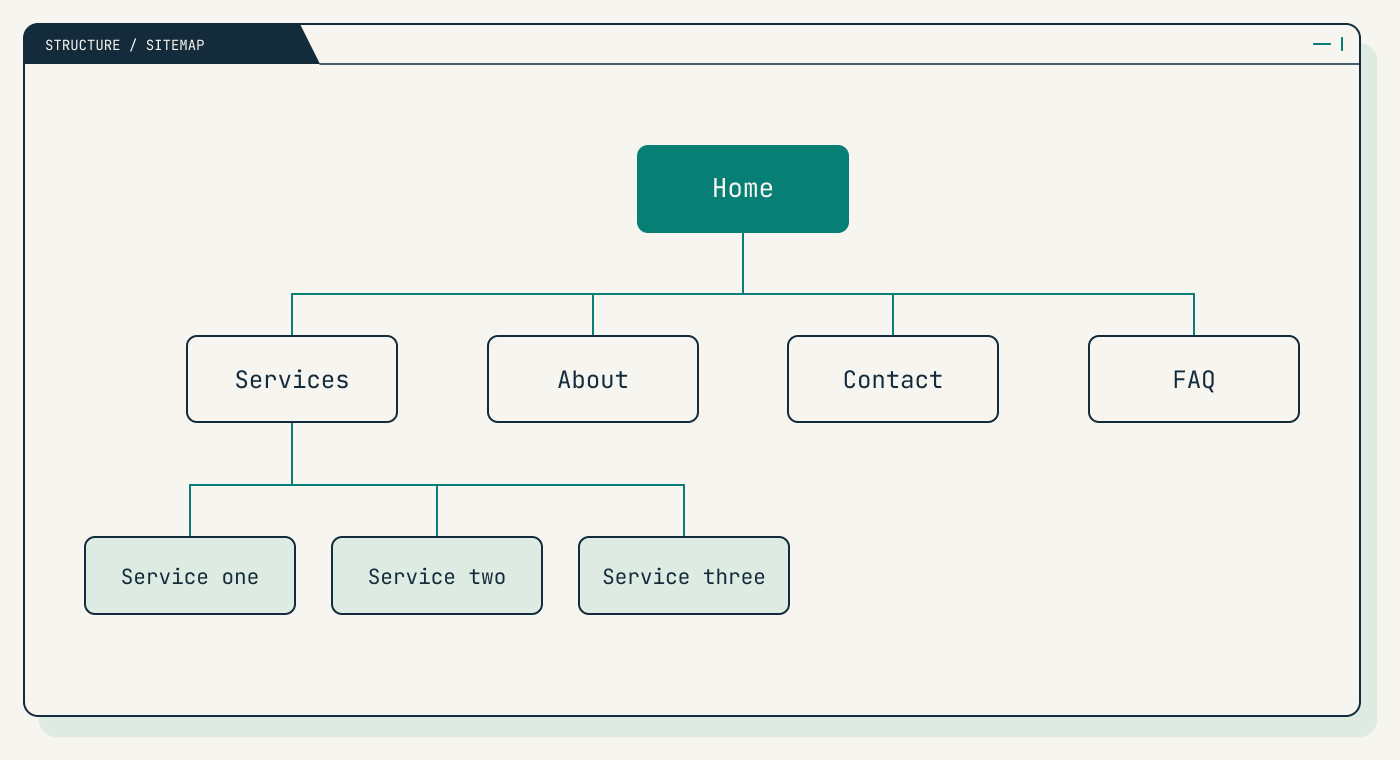
Your sitemap is the list of pages and how they connect. For most small business websites, the essentials are:
- Home: what you do, who you help, and the main next step.
- Services: an overview, plus one page for each main service.
- About: who’s behind the business and why customers can trust you.
- Contact: phone, email, form, location or service area, and opening hours.
- Privacy policy: needed if your forms collect personal details.
Optional pages include an FAQ, a portfolio or work page, a blog, and location pages if you serve several areas. Keep the main menu short. If a page doesn’t help a visitor decide or act, it probably doesn’t need to be in the navigation. Mapping this structure early is one of the first things we do in a web design project.
5. Map the inquiry journey
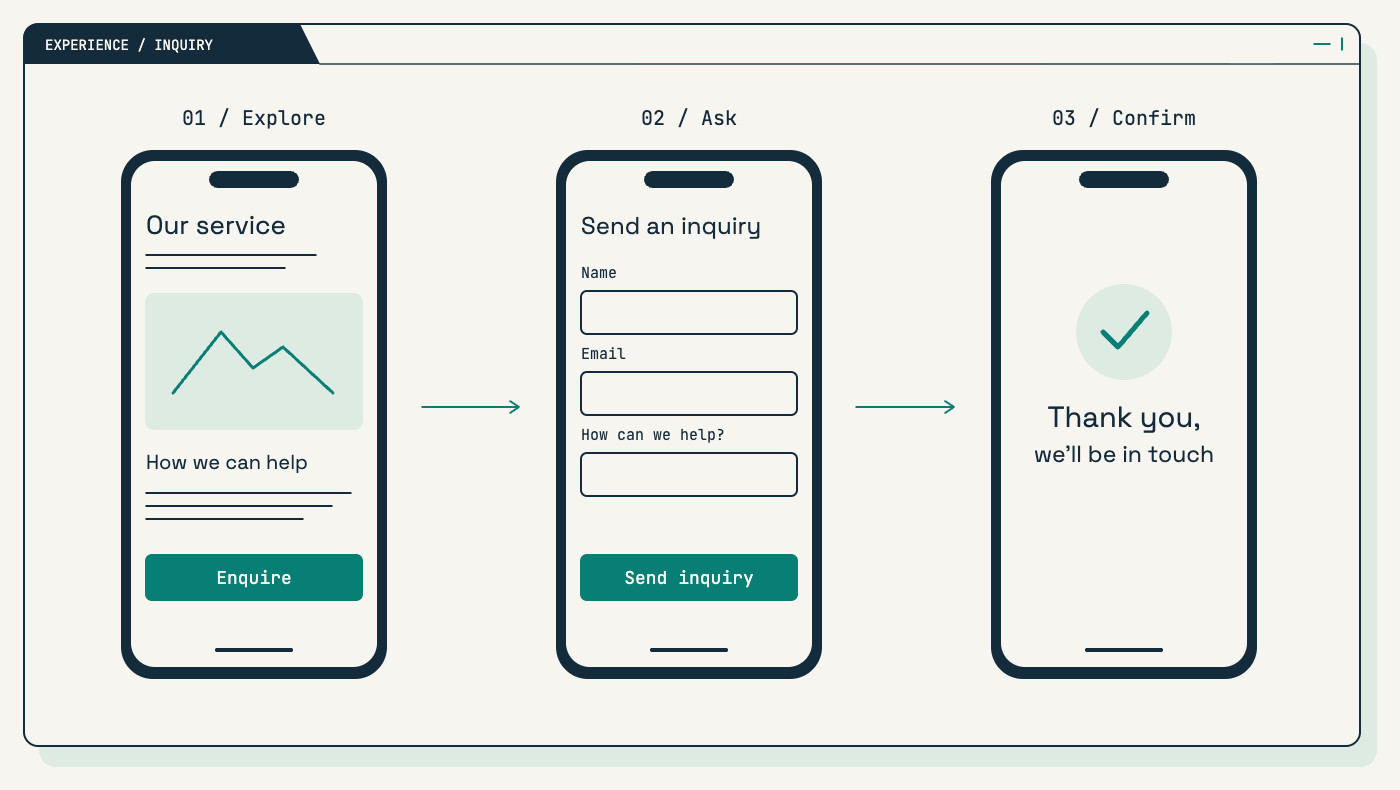
Picture a customer finding you on their phone. What do they tap first? How many steps does it take to call you or send a message? Plan where your phone number, inquiry form, booking link, or chat option appears on each page. Keep forms short and ask only for what you need to reply well. Decide who receives inquiries, how quickly your team will respond, and what the visitor sees after they hit Send.
Plan for mobile first. Many visitors will see your website on a phone before they ever see it on a laptop, so buttons, text, and contact details need to work on a small screen.
6. Gather your brand assets
Collect your logo files, brand colors, fonts, and any existing brochures or social graphics. If your logo only exists as a small image from years ago, or your materials all look a little different, sort that out before the website is designed. A consistent look makes a new business feel established. If you’re starting from scratch, branding and identity work can give you a logo direction, colors, type, and simple usage guidance to build the website around.
7. Plan your content and photos
Content is the most common reason website projects slow down. Decide early who will write each page and who will approve it. Make a simple content list with each page, what it needs to say, and who owns it.
- Reuse what already works, such as service descriptions from proposals or answers you give customers often.
- Plan real photos of your team, workspace, or products where you can. They build more trust than generic stock images.
- Collect anything you need permission to use, such as partner logos or customer quotes.
If you’d like help with writing or photography, say so when you request a quote so it can be included in the scope from the start.
Plan every page around the one action you want a visitor to take. The design decisions get easier from there.
The Firstrive team
8. Plan for search from the start
SEO works best when it’s part of the plan, not something added after launch. For each main page, note the words a customer would type into Google to find it, such as your service plus your city. Use those words naturally in page titles, headings, and descriptions. Make sure your business name, address or service area, and phone number are written the same way everywhere, and set up or update your Google Business Profile if you serve local customers. Google’s own SEO Starter Guide is a helpful plain-language read. Our SEO service covers page priorities, on-page work, and technical checks if you’d rather hand this part over.
9. Choose your platform, features, and who owns what
List the features you need now and the ones you’ll likely need within a year: contact forms, online booking, a newsletter signup, a members area, or an online store. This list shapes the platform choice. For most service businesses, a WordPress website gives your team an easy way to edit pages and publish updates. If you sell products, a store built on WooCommerce or Shopify is usually the better fit, and our ecommerce service covers product setup, checkout, payments, and shipping.
Also decide who owns the important accounts. Register your domain name in your business’s name, keep the login details somewhere safe, and make sure you have access to your hosting, email, and analytics. Owning these accounts makes it easier to change providers later if you ever need to.
10. Decide who looks after the website after launch
A website needs regular care. WordPress, themes, and plugins need updates, backups need to be taken and tested, and content goes out of date. Decide who on your team will update content, and who will handle the technical side. If nobody has time for routine checks, a website maintenance plan covers updates, backups, and routine checks so small problems don’t turn into big ones.
Budget and timeline: what to know before you ask for quotes
You don’t need an exact figure, but a budget range helps any web designer recommend the right scope. The main things that affect website cost and timing are:
- Number of pages and templates: a five-page service site is a very different project from a large catalog.
- Features and integrations: booking systems, payments, and connections to other tools add build and testing time.
- Content readiness: projects move faster when text and photos are ready on time.
- Branding: a site built on an existing brand starts sooner than one that needs a visual identity first.
- Content migration: moving many pages or products from an old website takes planning.
If you have a launch date in mind, such as an opening or a campaign, share it early so the plan can work back from it.
Your website planning checklist at a glance
Before you contact a web designer, try to have these answers ready:
- The main action you want visitors to take.
- Who your customers are and the questions they ask.
- Your list of services, with the ones to promote first.
- A draft sitemap of the pages you need.
- How visitors will contact, book, or buy, especially on a phone.
- Your logo, colors, and fonts, or a plan to create them.
- Who writes the content and where the photos will come from.
- The search terms each main page should target.
- The features you need and who owns the domain and hosting.
- Who will maintain the website after launch.
Don’t worry if some answers are still rough. A good web design partner will help you fill the gaps. That’s what the first stage of a project is for.
How Firstrive plans a website with you
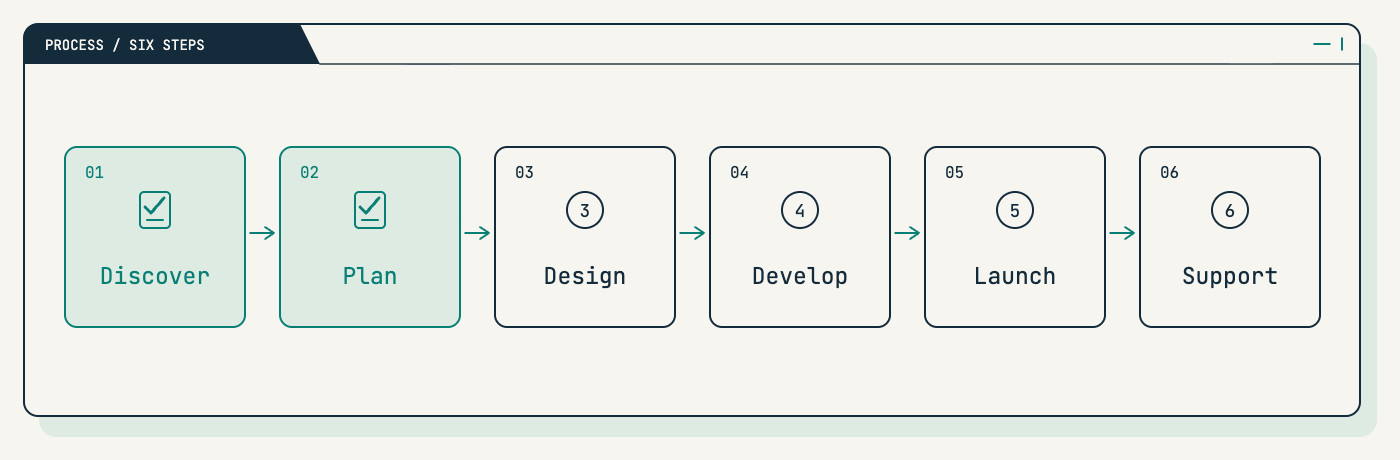
Every Firstrive website project follows the same six steps, and the first two are all about planning:
- Discover. We learn about your business, your customers, and what the website needs to do.
- Plan. We agree on the site structure, the pages, the features, and a clear scope before any design starts.
- Design. You review wireframes and visual designs, including mobile layouts, before anything is built.
- Develop. We build the site with forms, integrations, content, and technical checks.
- Launch. We take the site live carefully and hand it over so your team knows how to manage it.
- Support. We stay available for updates, fixes, and improvements as your business grows.
Frequently asked questions
What pages does a small business website need?
Most small business websites need a homepage, a services overview with a page for each main service, an About page, a Contact page, and a privacy policy if your forms collect personal details. An FAQ, a portfolio, a blog, and location pages are useful additions depending on your business and goals.
How long does it take to plan a small business website?
It depends on how clear your services are and how much content you already have. If you work through this checklist first, the planning stage with your web designer moves much faster. Your proposal should include a clear scope and timeline before design begins.
Should I write my own website content?
You know your business and customers best, so your input is essential either way. Some owners write their own first drafts, and others prefer a copywriter to shape their notes into web copy. If you want help with writing, mention it when you request a quote so it’s scoped from the start.
Let’s talk about your next step
Planning a new website, or replacing one that no longer fits? Firstrive plans, designs, and builds websites for small businesses and startups in the Philippines and around the world, and we’ll help you work through every item on this list.
Share your project details and we’ll review your needs, then follow up with questions or a proposed scope and quote. Request a free quote. Already have a website? Start with a free website audit to see what to keep and what to plan differently.
Tell us about your project
Let’s talk about your next step.
Share your project details. We’ll review your needs and follow up with questions or a proposed scope and quote.